The intent
Every trade stays linked to the provider's original message. No one has to guess the setup afterwards: it's written down.


tradingwith.io gives you a dedicated server that comes included, executes with your credentials on your MT5 broker, and shows you every decision on Mac and iPhone. The engine that copies your providers' signals arrives in the next phase.
Today you assemble that from loose parts: a copier here, a journal there, a verifier somewhere else, spreadsheets to glue it together. tradingwith.io is the whole system: it executes, manages, audits and shows you, coherent end to end. Signal copying arrives in the next phase.
A regular journal reads your broker after the fact: it sees fills, not decisions. tradingwith.io executes: the data is born inside.
Every trade stays linked to the provider's original message. No one has to guess the setup afterwards: it's written down.
A skipped signal doesn't exist in your broker history. In tradingwith.io it does, with its reason: filter, risk, market closed.
The message price, the fill price and every later adjustment are recorded separately: slippage is measured against the plan, not a reconstruction.
Nothing to split or merge by hand: the system that executed the trade is the one writing it down.
No three-hour syncs: what happens in your account shows up on your console as it happens.
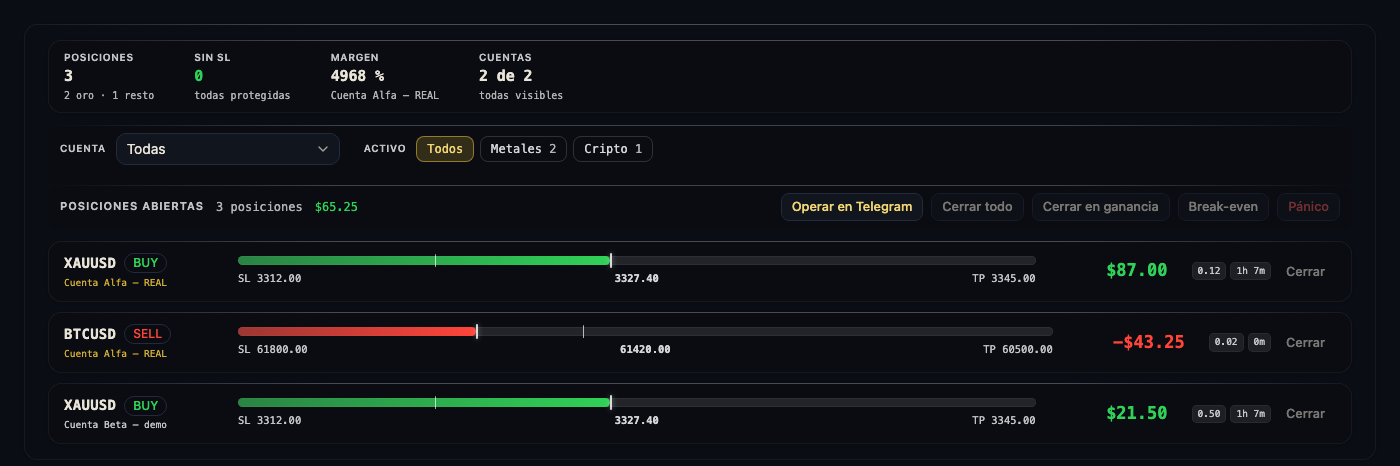
Dark glass, the data up front, nothing in the way. The same data on Mac and iPhone: just like your broker, but all your accounts in the same place.
Open positions3
We create it when you sign up and hand it over: our key leaves, yours goes in, and the bridge to your MT5 keeps running there 24/7. There is no second bill to arrange.
Your broker credentials stay with you. We never see them.
Every provider, every risk rule and every pause is controlled from the Mac console with a tap, and from Telegram by talking to it.
The subscription is bought inside the app, through the App Store: monthly or yearly plan, with 7 free trial days. Apple charges you, in your currency, and you cancel whenever you want from Apple Settings. Nothing is paid on this website.
Coming soon to the App Store: the app is still in development.
Join the list and we'll let you know the day it can be downloaded.
Done. We'll let you know as soon as it opens.
That email doesn't look valid.
We can't add you to the list right now. Please try again in a few minutes.
Reserving a seat only asks for your email. Nothing is charged.
No. It is included in the subscription: we create your dedicated server during sign-up and hand it over to you, with the bridge to your MT5 running there. One single fee, no separate third-party bills.
MetaTrader 5, with your own account at the broker you already use: tradingwith.io is the hub for your accounts and isn't tied to any broker. If yours isn't verified yet when you sign up, tell us: if its installer can be verified, we add it.
You do. Your broker and Telegram credentials live on your server and in your keychain; they never pass through our servers. When sign-up finishes, your key replaces ours and the server deletes the provisioning one: a record stays on your machine showing which key came in and which ones left.
You cannot buy yet: the app is still in development and is not on the App Store. The sign-up journey is already built and tested (code by email, server created and handed over on its own) and it switches on when we open. Two things are missing before that: the engine that copies your providers' signals, which arrives in the next phase, and publishing the app. The waitlist gets in first, in order.
Yes, whenever you want: the subscription is cancelled in Apple Settings, because the charge is theirs. Before your server is retired we let you know, and you can export your journal as CSV from the app; your data leaves with you.
Tell you when we launch. Nothing else: no analytics, no cookies, no third parties on this page.
When we open: you subscribe inside the app (monthly or yearly, with 7 free trial days) and the app creates your server, hands it over and sets up your broker. Mac and iPhone both work: you don't need both. The app is not on the App Store yet, so the step you can take today is reserving a seat.